
How To Use Claude: Setting Up Projects

In the first post in this series, you learned what Claude is, where it lives, and which model to reach for. It was a simple post, but every foundation needs a blueprint, a map of sorts. But here's the thing about maps — handing someone a map to Wonderland doesn't mean they won't walk straight into the wrong door the moment they arrive.
And when it comes to creating content with Claude, most content marketers do exactly that. They've got the tool, they open it up, and they start prompting into the void — no structure, no setup, no strategy — then act surprised when the output sounds like it was written by AI Chad, or worse, a mediocre tech boy who thinks he’s a god (but we know he isn’t).
The secret to turning Claude into a wonderland of ideas lies in the foundation you create. The set up isn't the boring part you skip to get to the good stuff. The setup is the good stuff. Get it wrong and Claude is just another content vending machine with a better vocabulary.
Setting Up Projects
This is where we fix that.Darlings, the generic AI content that gets you or your brand canceled happens when you skip the setup. Skip the setup, get content that screams "I used AI and didn't care enough to make it good." Tell me, can you spend 30 minutes setting this up correctly and everything Claude creates will sound like you instead of like everyone else? I think you can.
But before you set up a single thing, you need to understand something most people get wrong — and it's the thing that determines whether Claude sounds like you or sounds like every other AI-assisted marketer on LinkedIn.
Where Your Instructions Actually Live
Claude doesn't have one place to put your instructions — it has four, and most people dump everything into the wrong one, then wonder why their output reads like it was written by a committee that couldn't agree on who the audience was.
Understanding all four matters because they don't work in isolation — they stack. Get the architecture right and Claude behaves consistently everywhere you work. Get it wrong and you spend half your session fighting output that ignores rules you know you set.
Layer 1: Profile Preferences — who you are and how you work, always.
Click your initials in the lower-left corner, then select "Settings" and look for the field labeled "What preferences should Claude consider in responses?" — that's Profile Preferences.
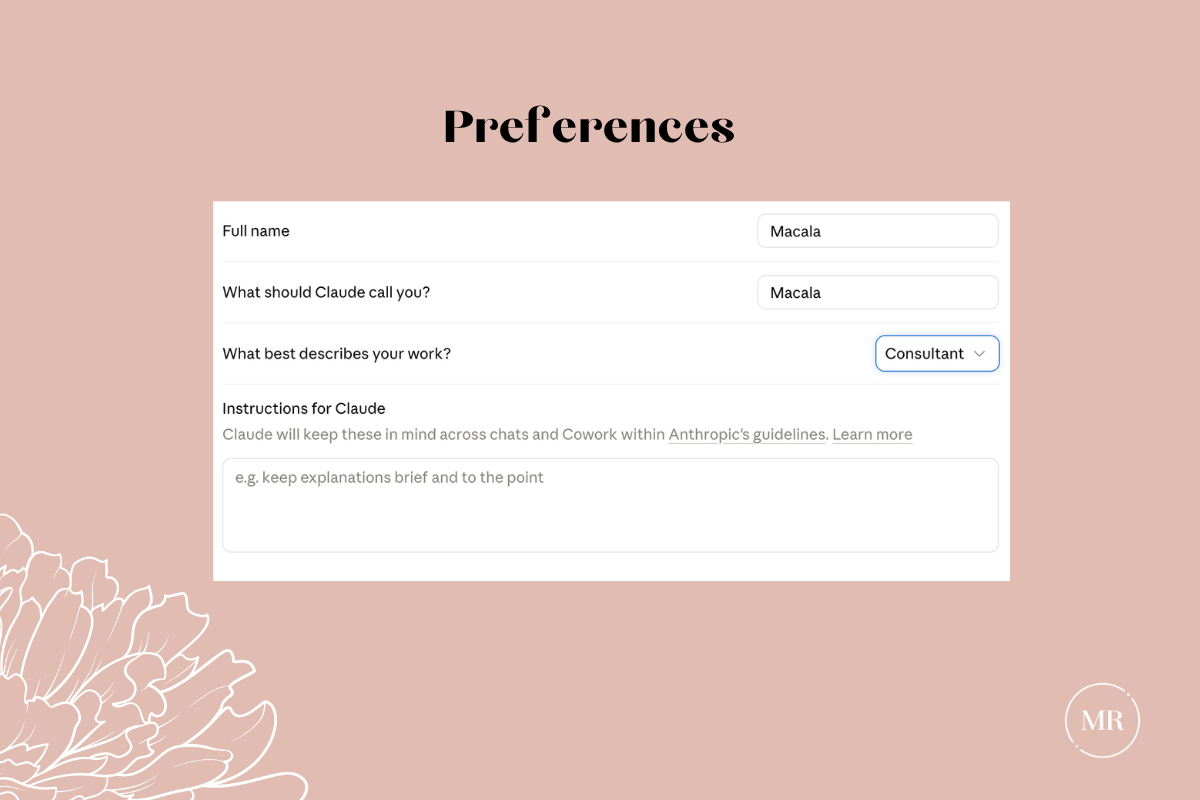
Whatever you put here is your identity as a communicator: your professional context, your standing rules, the things that are always true about how you work regardless of what you're making.
Profile Preferences apply to every standalone conversation you have with Claude — and they also load inside Projects, where they serve as your baseline. But here's the part most people miss: inside a Project, Project Instructions take precedence. Profile Preferences don't disappear — they stack underneath. Think of it as a chain of command: Profile Preferences set your defaults, Project Instructions give the orders for this specific workspace, and when there's a conflict, the Project Instructions win.
Something like:
"I'm a B2B content marketer specializing in [industry]. I prefer direct, conversational language — no corporate jargon, no 'leverage,' no 'synergize,' no 'cutting-edge.' Use an active voice. Keep paragraphs to 3-4 sentences. When I ask for content, skip the preamble and get to work."
You set this once and it applies everywhere. But know that any Project you work inside can — and should — layer more specific instructions on top of it.
Layer 2: Project Instructions — the standing orders for this workspace.
These live inside each Project and tell Claude how to behave when it's working on this particular kind of content. Every conversation you start inside that Project inherits these instructions automatically, which means you're not re-explaining your brand voice and audience every time you open a new chat.
If something here conflicts with your Profile Preferences, Project Instructions win. This is by design. Your global preferences are your defaults; Project Instructions are your specifics, and specifics should always beat defaults. This is where the real strategic setup for content teams happens, and it's what the rest of this guide builds out.
Layer 3: Styles — how Claude formats and delivers its responses.
Styles control the surface presentation of Claude's output: tone, length, formatting structure. Build custom ones from your own writing samples and Claude learns to match how you actually write, not how it defaults.
They also function as a quality control mechanism — when Claude's output feels off, your Style is the reference point that tells you where the drift is happening before it ends up published. To apply one, open the plus menu in any chat and select "Use style." To build a custom one, go to "Create & edit styles." A full guide to building and applying Styles is coming in a later installment.
One heads up: Anthropic is currently migrating Styles into a broader feature called Skills. Functionality stays the same — only the UI surface is changing. If you see Skills in your plus menu instead of Styles, you're in the right place.
Layer 4: Your Prompt — the specific ask, right now, in this conversation.
This is what you type in the chat — write this blog post, draft this case study, rework this opening paragraph. It's the work itself, not the context behind the work.
Why Your Stack Matters
This process is something I designed to help you not fail out of the gate. Too often, I see content teams with solid set ups but the outputs aren’t what they expect. They wonder why Claude keeps defaulting to behaviors they thought they'd already ruled out. Nine times out of ten, the answer is that the Project Instructions are missing, incomplete, or conflicting with the Preferences in a way nobody caught. The four-layer system is how you fix it.
How to Think About Project Structure (Without Overthinking It)
The difference between a Project that works and one that doesn't usually comes down to structure. Get it right and Claude has exactly what it needs to do the work well. Get it wrong and you've built a very organized mess.
For example, a content team creates one project called "Marketing" or "Brand Content" and throws everything into it. Brand guidelines, blog prompts, email templates, social media rules, SEO keywords, audience research, campaign briefs, all of it in one beautiful, chaotic pile.
And then they wonder why Claude's output feels muddled, why it's referencing email marketing rules in a long form article, why the tone keeps shifting like it can't decide who it's talking to. It can't decide because you gave it everything and told it nothing about what matters right now.
Darlings, projects are workspaces, not filing cabinets. You have to create project structures within Claude organized by your use cases. This doesn't necessarily mean you need a separate project for every format you've ever published in. You need to ask yourself, does Claude need different reference material and different rules to do this work well?"
For example, blog posts, case studies, and long-form articles probably belong in the same project, because they draw from the same voice, the same depth, the same audience research, and the same strategic positioning. You're just asking for different lengths and structures, and Claude can handle that at the prompt level without needing a whole different workspace.
Your LinkedIn newsletter could go either way — if it matches your blog voice and draws from the same themes, it probably lives in the same project. But if your newsletter is more personal, more opinionated, more you than your company blog, that shift in voice and tone might warrant its own space with different examples and different instructions.
Social media is likely its own project, because the energy is fundamentally different. What makes a strong blog opening makes a terrible social hook. Your social voice might be sharper, more provocative, built to stop a scroll rather than earn eight minutes of reading time. The reference material changes too — engagement data, platform-specific guidelines, hook examples that have nothing to do with your long-form work. Claude needs different instructions to do that well.
Email sequences are almost certainly their own project, because the audience stage, intent, and conversion psychology have almost nothing in common with educational content. The rules for a nurture sequence and the rules for a blog post are different animals entirely. Your monthly or yearly email schedules are built on certain email templates and content requirements. To generate them, all of it needs to live in a dedicated project.
And anything related to podcasts and video editing gets its own setup too. The best podcasters and YouTubers have multiple projects mapped to their production sequence and team workflows.
So the split isn't about format — it’s about when the voice changes, when the audience or intent changes, or when Claude needs genuinely different documents to do the work well. If any of those are true, that's a separate project. If not, it's the same project with a different prompt.
The right structure is whatever matches the way you actually think about the work.
How to Set Up a Project
Here's exactly how I build projects for content-related work — blog posts, articles, guides, and educational pieces. Use this as your template for building any Project, because the framework is the same every time and what changes is what you put inside it.
Step 1: Create the Project
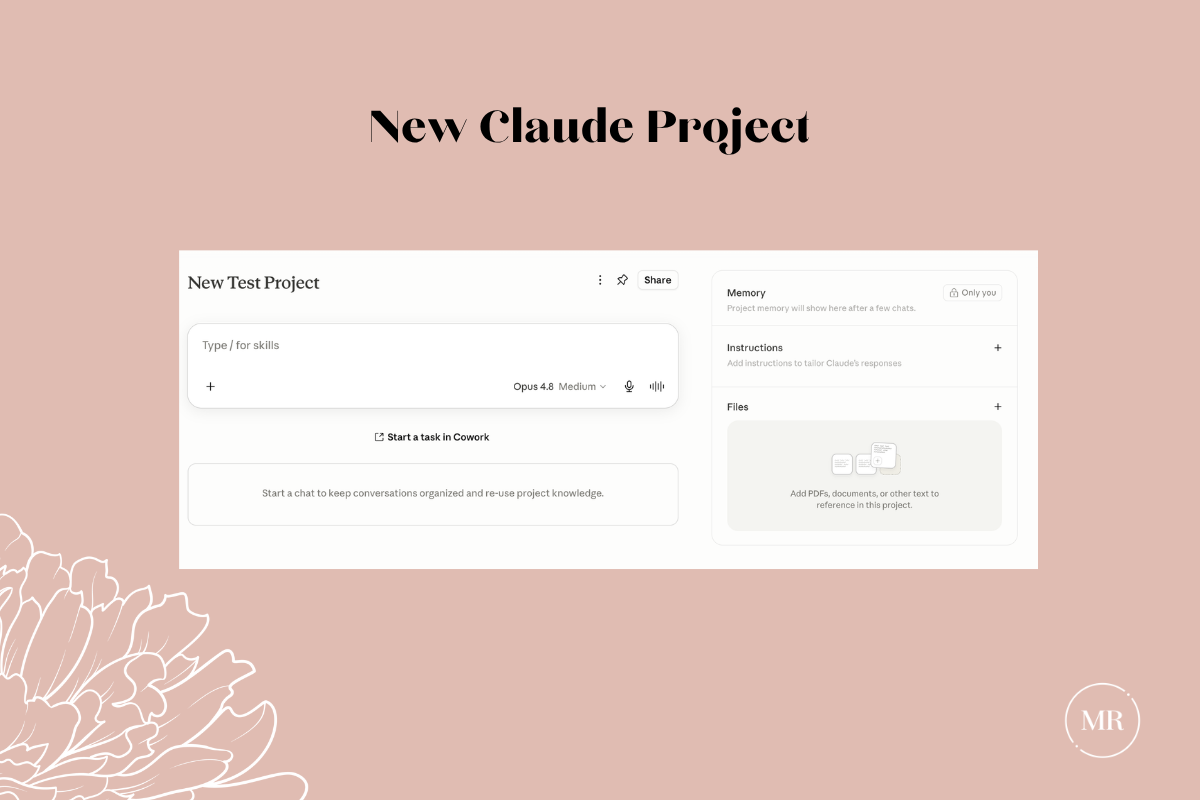
On the web or desktop app, hover over the left sidebar and click "Projects," or navigate directly to claude.ai/projects. Then click "+ New Project" in the upper-right corner and name it something specific — "Long-Form Content" or "Blog & Article Creation," not "Marketing" or "Content." The name should tell you exactly what kind of work happens inside this workspace.
One thing worth knowing: Claude cannot read your project name or description — those fields are for your own organization. Your actual context needs to live in the Project Instructions and knowledge base, not the name field.
Step 2: Upload Your Project Knowledge
Project knowledge is the reference library Claude draws from inside this Project. Every conversation you start here has access to these documents automatically, so you upload them once and Claude references them for everything you create in this workspace.
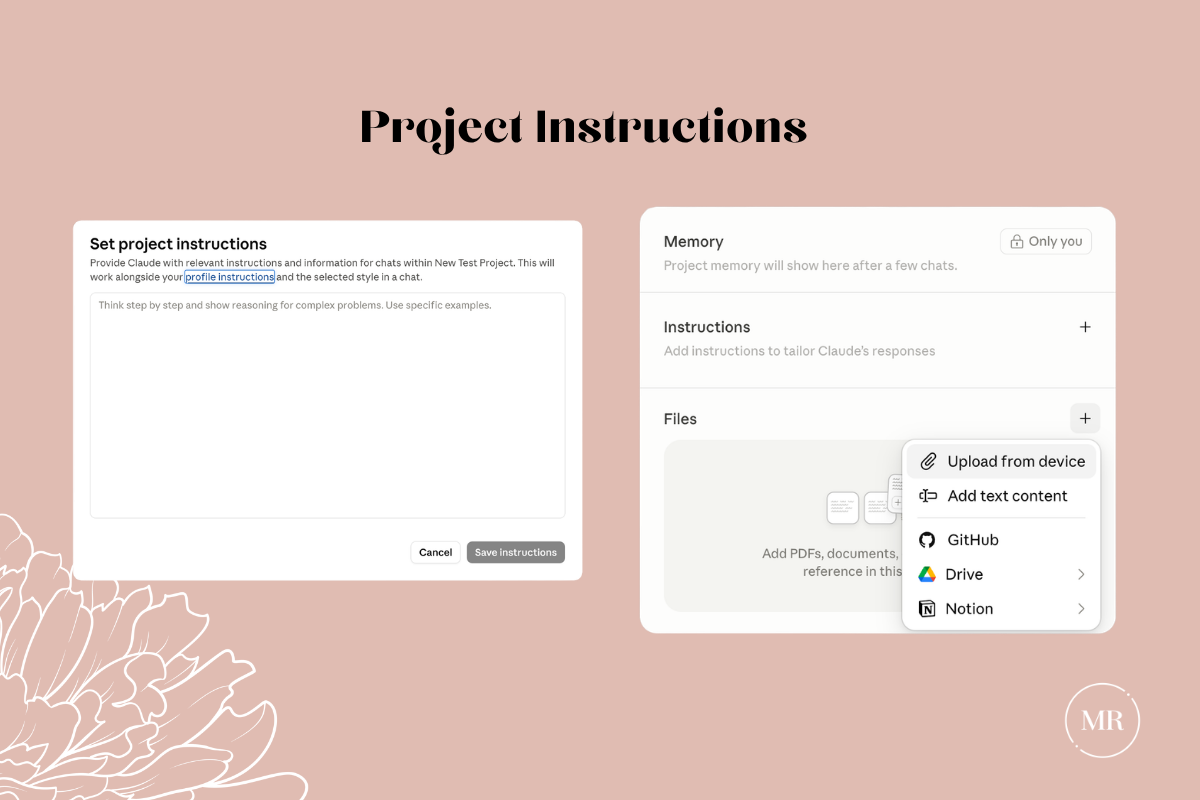
For a long-form content Project, here's what to upload:
Brand voice examples. Three to five of your best-performing pieces — blog posts, articles, whatever represents your brand at its sharpest. Pick pieces that show a consistent voice across different topics, because you want Claude to identify patterns in how you communicate, not just what you communicate about.
Audience documentation. Target audience descriptions with specific pain points, not just job titles. What keeps them up at night, what do they search for, what language do they use when they talk about their problems — the kind of detail that makes the difference between content that resonates and content that gets skimmed and forgotten.
Messaging framework. Your core positioning, key messages, value propositions, and differentiators. This is the strategic backbone that should run through every piece of content you create, and if Claude doesn't have access to it, your content will lack the kind of consistent positioning that builds authority over time.
Product or service descriptions. What you sell, the key benefits, how it solves your audience's problems. Claude needs to understand what you're ultimately driving toward so the content serves a business purpose, not just an editorial one.
Content themes or editorial calendar. Current campaign briefs, topic clusters, or strategic content themes you're working within right now, because context about what you're focused on helps Claude create content that fits into a larger narrative rather than floating in isolation.
Project knowledge bases support PDF, DOCX, CSV, TXT, HTML, ODT, RTF, EPUB, and JSON — 30MB per file, unlimited uploads. One caveat: "unlimited" applies to storage, not what Claude can actively reference in a single conversation. For most content marketing workflows, you'll never hit that limit. XLSX requires an extra setup step — enable the analysis tool in your account settings first, or just export to CSV. For full details on file limits and supported formats, see Anthropic's documentation.
What does NOT go here?
Your email sequences, your social media guidelines, your SEO keyword lists — anything that belongs to a fundamentally different type of content works with different rules and different reference material. That goes in its own Project.
Step 3: Analyze Your Voice
Before you write a single instruction, let Claude tell you what it sees in your content. Upload your best examples and ask:
"Analyze these content examples and identify specific patterns in voice, tone, and style. Focus on sentence structure, word choice, transitions, and distinctive elements that make this content sound like our brand."
Claude will come back with a detailed breakdown, and your job is to review it carefully and ask yourself whether it actually captures what makes your content yours. Maybe you always open with a contrarian take, or you never use industry buzzwords, or your paragraphs are unusually short, or your transitions are abrupt on purpose because that's part of your voice. If Claude missed something important, note it — you'll build it into your instructions next.
This analysis becomes the foundation for your Project instructions, and it's the difference between Claude approximating your voice and Claude nailing it. Don't skip it.
Step 4: Write Your Project Instructions
Your Project Instructions establish standing orders for every conversation in this Project. This isn't where you write "be conversational" and hope for the best — this is where you get specific enough that Claude can't get it wrong.
Here's what effective Project instructions look like:
Voice and style rules — be precise about what you actually mean.
Instead of: "Write conversationally"
Write: "Use sentences between 10-20 words. Break longer thoughts with commas. Never exceed 25 words per sentence."
Instead of: "Explain technical terms"
Write: "Define every technical term on first use with context." And give an example: "Search engine optimization (SEO) helps your content rank higher in Google results."
Content structure rules.
"Keep paragraphs to 3-4 sentences maximum. Use subheadings every 200-300 words. Open every piece with a specific, concrete claim — not a generic statement about the industry."
Audience context.
"Our primary audience is [specific role] at [specific company type] who are dealing with [specific challenge]. Write to their experience level — they understand [X] but need help with [Y]."
What to always do.
"Include specific examples when making claims. End with clear, actionable next steps. Reference our uploaded brand voice examples and audience descriptions when creating content."
What to never do.
"Never use tired industry openers or any variation. Never open with a question. Never use bullet points where a strong sentence would work better. Never hedge with 'it's important to note that' — just say the thing."
Vague instructions create vague content — and you'll spend more time editing Claude's output than you saved by using it. Precise instructions create content that sounds like you wrote it — because you essentially did, just at the structural level instead of the sentence level.
Step 5: Test Your Setup
Ask Claude: "Based on our uploaded documents, summarize our brand voice, primary audience, and main content themes."
Claude should reference specific details from your materials — not generic descriptions that could apply to any brand. If the response feels generic, either your uploaded documents aren't specific enough or your instructions need more detail. Go back and add more teeth.
Then test with an actual content request:"Write the opening paragraph of a blog post about [topic relevant to your business]."
Read it out loud. Does it sound like something your organization would actually publish? Could someone in your target audience tell this came from your brand specifically, rather than from a competitor running the same AI? If yes, your setup is working. If not, go back to your instructions and figure out what's missing — because something is.
This one-time setup saves hours of revision later and ensures everything Claude creates within this Project sounds like you, not like generic AI content.
Written by
What's Next?
How to Use Claude: Connectors and Integrations That Matter
The majority of Claude's documentation is designed for developers, and it's not focused on content. But buried in the developer-speak are connectors — integrations that let you pull information from your existing tools directly into Claude — and understanding which ones actually serve content work versus which ones are noise will save you from building a workflow that's more complicated than it needs to be. The Connectors Directory now has over 200 integrations, and connectors are available on
How to Use Claude for Content Marketing
A bad bitch's guide to what Claude is, how its models and features work, and why understanding the tool comes before your team writes a single prompt I've been working with digital for over a decade, strategy, data, analytics, you name it, I've mastered it. Four years ago, when AI tools became a tool marketers could use to make their work more efficient, I tested the shit out AI tools and platforms in order to see what worked best. Now, in the last 24 months, I've watched the internet transfor
How to Use Claude: Connectors and Integrations That Matter
The majority of Claude's documentation is designed for developers, and it's not focused on content. But buried in the developer-speak are connectors — integrations that let you pull information from your existing tools directly into Claude — and understanding which ones actually serve content work versus which ones are noise will save you from building a workflow that's more complicated than it needs to be. The Connectors Directory now has over 200 integrations, and connectors are available on